



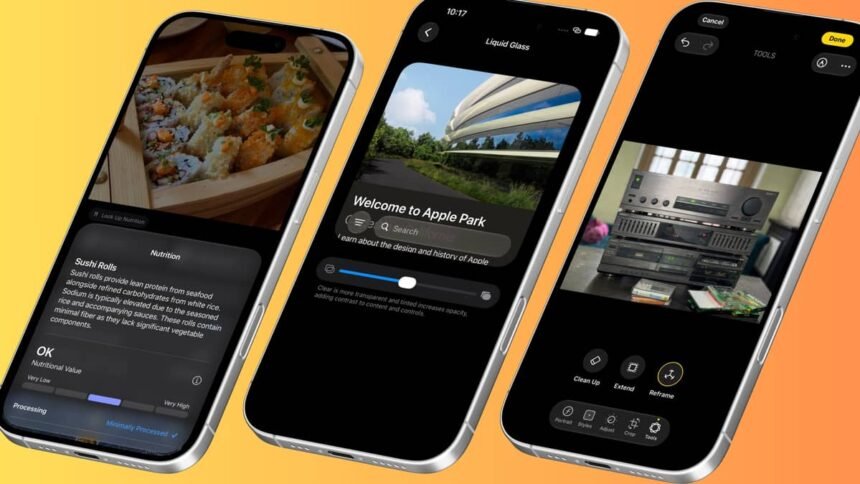
The iOS 27 public beta has gone live, meaning you no longer need a developer account to try any of the new features. Anyone with a compatible iPhone can sign up at beta.apple.com for free, switch on beta updates in Settings, and start running it once it downloads and installs. It is a remarkably stable beta. Here are the features worth knowing about.
Extend and Reframe
In the Photos app, opening a picture to edit now reveals two new tools alongside the improved Clean Up, which was already there for erasing background clutter and has become noticeably better. The two newcomers are Extend and Reframe.
Extend uses generative AI to stretch the edges of a photo, regardless of which camera it was taken on, in any direction. It is a commonly used trick, similar to what Photoshop offers. If you shot something in portrait but now want it in landscape for a video, you simply extend and pinch outward, and the tool does a impressively good job of reconstructing whatever lay beyond the original frame. It works best with patterns and abstract textures, though it also handles entire objects convincingly, generating more of them from scratch.
Spatial Reframe is far more ambitious. It lets you drag around and morph the perspective from which a photo appears to have been taken, effectively repositioning where the camera stood in physical space, then generates the new pixels it could not originally see. Both features require an internet connection, so attempting them offline or on a flight will simply return an error, since the heavier processing happens on Apple’s cloud models.
Image Playground
The app has had a complete overhaul this year. Anyone who dismissed it last time for producing stiff, lifeless results should give it another go. Open it, throw in a prompt, and see what comes back; it may well surprise you. It is one of the more enjoyable features to play with for a few minutes, and a useful gauge of how far Apple’s image generation has caught up with rival platforms.
Say it aloud
The natural language support in Reminders and Calendar deserves attention. Typing a reminder the way you would say it aloud, such as “Go get groceries at 6pm tonight”, prompts the app to pull out the time and location and slot them in automatically. Calendar does something similar, though it is a little less hands-off: it picks up the time without prompting but defaults to whatever date you happen to be viewing, so sending an invite for a specific day still requires tapping the date suggestion that appears above the keyboard. Still, it is a welcome step forward.
Alarm zone
This is a genuine quality-of-life upgrade. You can now set a separate volume for alarms, independent of your ringer. Anyone who turns their ringer down at night, or keeps it low during the day to avoid a barrage of notifications, no longer risks their alarm fading along with it. Previously, plenty of people slept through alarms that quietened along with everything else. Now, the alarm volume is set once in Sound settings and stays fixed, regardless of any other volume changes.
Better Wi-Fi management
Switching from a weak home Wi-Fi network back to cellular has long been a mild annoyance, particularly when leaving the house and immediately opening Maps to check traffic for the first couple of streets. Previously, the phone would only drop the Wi-Fi connection after moving a fair distance away. iOS 27 handles this far better, switching to cellular the moment you step outside.
Custom EQ
AirPods now support custom EQ, though only for models with an H2 chip or later. It is a modest three-band equaliser, but a welcome addition nonetheless.
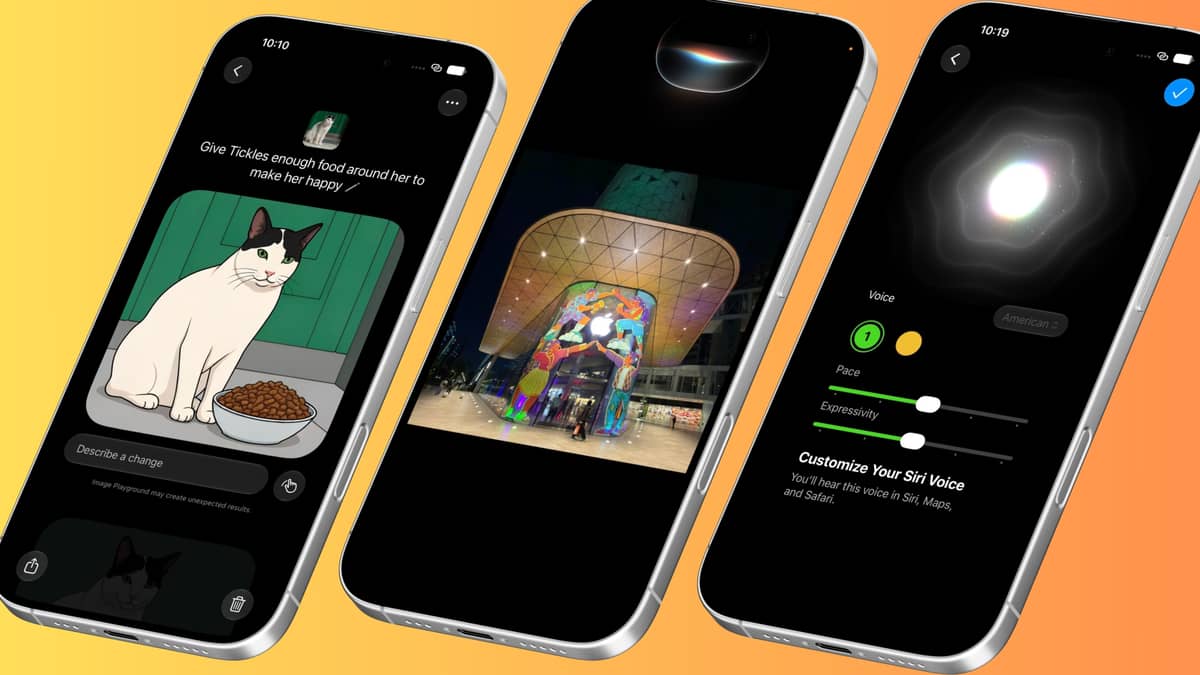 (Left to right) On iOS 27 Public Beta, Image Playground has been revamped, Siri AI is new and comes with a fresh UI, and you can customise the voie of Siri. Picture: The Telegraph / Mathures Paul
Design updates
Liquid Glass, introduced in iOS 26, is here to stay, but this year brings a new level of customisation. Icons have been subtly refined for clarity, with crisper text and shadows that are easier to read. There is also a slider to dial in exactly how much Liquid Glass effect you want, from fully opaque and frosted to almost entirely transparent, catering to both camps. The lock screen gains a new compact clock option, and the home screen’s swipe-down search has been redesigned and merged with Siri.
Siri AI
The new Siri, now called Siri AI, is this year’s headline feature, though Apple is rolling it out in English first. It arrives with a complete overhaul, beginning with a new animation: holding down the power button, as before, now expands a half-translucent, half-opaque crystal orb from the Dynamic Island that shifts as you speak. Once it delivers an answer as an overlay, you can drag the bottom down to expand it into a full conversation window, or go further and open it in its own standalone Siri app, complete with a saved history of past requests.
Siri now understands personal context, draws on broader world knowledge, and speaks with a more expressive, human-like voice that can also be customised. It is more conversational overall, retaining context across follow-up questions rather than treating each query in isolation, and it has on-screen awareness, allowing you to ask about whatever is currently displayed on your iPhone.
Its most significant new capability is delving into personal data stored on the phone, including iMessages, emails, calendar entries and photos. On first installing the update, Siri spends a while indexing in the background, sometimes taking a couple of days, after which it can field genuinely nuanced questions and surface material from your personal history, provided it has passed through an Apple app. This mirrors what Google is doing with Gemini, which reaches into the cloud to pull from Gmail and Google Calendar, though Siri arguably has the edge by indexing locally, presenting results more visually, and working across multiple formats, including images. A new Siri mode in the Camera app, just one swipe away, lets you snap a photo and ask Siri about it directly.
Naturally, Siri performs best for anyone deeply embedded in Apple’s own services, such as iMessage, Photos and Calendar. It currently has no visibility into conversations held on WhatsApp, Telegram, Gmail or similar third-party apps, though developers may eventually be able to push updates that let Siri surface specific flagged content from within their own apps.
Look up nutrition
Opening a photo of food in the redesigned Photos app prompts Siri, which can already identify that the image shows food, to surface a “Look Up Nutrition” button rating how healthy the dish appears on a sliding scale. It offers nothing as granular as calorie counts, but it is a handy touch when accurate.
Passwords app
The Passwords app can now scan through saved credentials and automatically fix weak or compromised passwords.
Fast and faster
Nearly everything in iOS 27 feels quicker than before, from AirDrop transfers to app load times. On a brand-new iPhone 17, the difference is fairly subtle, but on older handsets, faster AirDrop speeds are noticeably more apparent. Given the long-running grumbles about iOS updates slowing phones down, it is refreshing to see support stretching all the way back to the iPhone 11 from 2019, with the new optimised CPU scheduler making an especially welcome difference to how that older phone feels.
Disclaimer: This content has not been generated, created or edited by Finance SC. Publisher:
Source link
Source link