



If you are a potential speaker or a moderator in Wikimania Paris 2026 or more events, enjoy this guide to reach higher standards of technical neutrality and inclusion.
1. ✅ Take Care of Tech Language
In television, some years ago, it was somehow normal to see brands of cigarettes or beverages used by actors. Then, advertising was regulated (example, 2010 regulation France). Nowadays, we still do product placement and in many unconscious situations, especially about closed source software.
Are these situations familiar to you, while talking about software?
«send me a Powerpoint»
We could say «send a presentation» which is more neutral and does not promote Microsoft Powerpoint, which is a closed source software. Also, consider we may have LibreOffice activists or OpenDocument advocates in the room, who may be frustrated about seeing the promotion of a competitor proprietary solution, or the promotion of proprietary file formats during a Wikimedia event and during volunteering.
«send me an Excel»
We could say “send a spreadsheet” instead of promoting Microsoft Excel.
«Hello to YouTube viewers!»
Consider that YouTube is not a generic tool but a proprietary product managed by Google. In many occasions we can just avoid to mention YouTube at all: who is in the room does not need YouTube, and who is from YouTube is already aware of YouTube. Also, Wikimedia events are published also on Wikimedia Commons later (especially Wikimania events), so, some phrases mentioning YouTube may have little sense in the recording. We can say «Hello to online viewers!» or similar phrases.
«Open the link in Chrome»
Consider that Google Chrome is a dominant proprietary product curated by Google. There are many other 100% open source browser webs instead. While it’s not important to mention all open source web browsers like Mozilla Firefox or Chromium, it’s easy to be neutral and say «open your browser» instead.
«Search it in Google» / «Google it» …
Even if Google.com is a dominant search engine, not all Wikimedians are happy to accept the Google’s Terms of Services, or are happy about executing proprietary code in the browser to find an information. We can just say «Search it online» or «Search it in your search engine» without promoting a particular proprietary service.
«Ask to Claude» / «Ask to ChatGPT» …
In our speeches, we can greatly reduce random mentions to our favorite closed source generative AI. Consider that some of these companies received billions of dollars from investors, hoping about massive adoption, and we are not necessarily part of this commercial scheme.
In short, one thing is using a proprietary software, and another thing is promoting it to the listeners. Find your optimal compromise and share these efforts with event participants and future speakers.
In the post comments we may see more practical examples to avoid the promotion of closed source products. Feel free to share!
2. ✅ Cover Logos about Proprietary Software
Surprisingly, not everybody in the world would be willing to immediately migrate their laptop to GNU/Linux and to Free Software 🐧 so, how-to to easily reduce product placement of proprietary products?
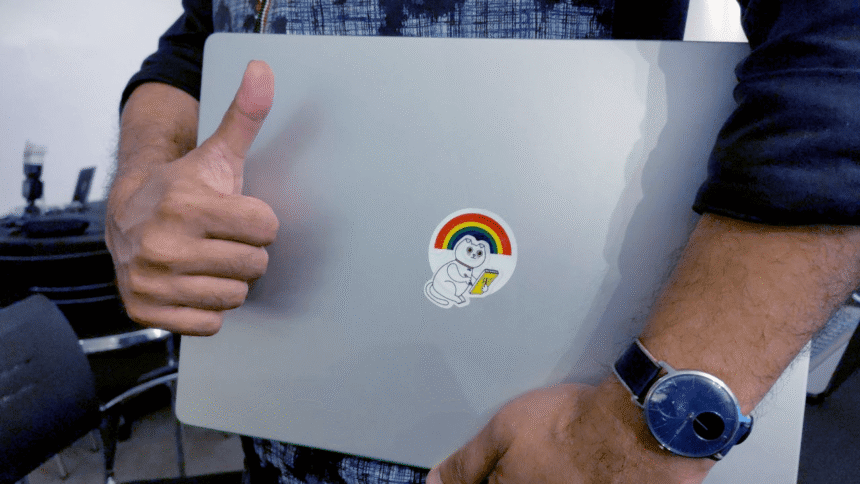
Carry with you some Wikimedia logos! A Wikimedia sticker can be effective to hide a brand.

Creative Commons Zero, by User:Valerio_Bozzolan, during Wikimania Nairobi 2025
FAQ: How to cover the Apple laptop logo? 🍏
The Apple logo is usually 35 mm (as determined by User:Chlod). This means the Apple logo can be easily hidden using an interesting set of objects with a minimal amount of adhesive tape.
FAQ: How to cover the Apple laptop logo 🍏 with another fruit?
Follow instructions by the artist Maurizio Cattelan.
FAQ: How do I get a temporary sticker?
Consider using minimal amount of adhesive tape, or an adhesive note. These will leave no traces.
3. ✅ Don’t share if not Full Screen

Creative Commons BY-SA 4.0, by KK IN HK, edited by Valerio_Bozzolan under the same license.
The rule of thumb is: show contents, not unrelated products.
To avoid any mishaps, we can set the presentation in full-screen before connecting the computer to the external projector. This way, you will be sure not to promote Google Drive, or Microsoft Office, or Adobe proprietary products, not even for a millisecond 🎉 Not only will this lead to a more professional presentation, but it will also be potentially more compatible with Wikimedia Commons, since you will successfully hide additional trademarked logos from your desktop or your toolbars, which is occasionally an extra burden for volunteers.
Alternatively, you can sacrifice your operating system and tools before the presentation and replace everything with Free Software! Things you can do in this vein include migrating from Google Docs to Nextcloud and Collabora Online; or from Google Chrome to Mozilla Firefox flavors; or from Microsoft PowerPoint to LibreOffice; or from Adobe Reader to KDE Okular; or from Zoom to BigBlueButton; or you can argue for years about what’s the best choice, without migrating anything — or, you can just enjoy the full-screen mode 🤓
FAQ: I’m full screen, but I still see the Apple logo. What to do?
If you still notice the Apple logo in the top-left corner and the current app icon, you additionally need this checkbox:
Apple > System Preferences > Dock & Menu Bar > Automatically hide and show the menu bar in full screen.
For Apple users, even with the above tip: moving the cursor may still activate the Apple logo over full screen presentations. If your system is not really capable of avoiding Apple product placement, consider using another laptop for your specific future presentations – or please contact Apple assistance and share the solution with us – as we are not aware of a way to just share your contents, and not share the vendor logo.
4. ✅ Have Fun, Be Respectful
Free/Libre and Open Source Software is about having fun with the technology, so that you are the user of the technology, and it’s not that technology which uses the users. This is supposed to be more fun, so have fun! But respect other people choices:
Having a papaya in front of your own laptop to hide one Apple logo may be to communicate your extra care about neutrality, but throwing papayas to other laptops is not a good idea.
5. ✅ Join Wikimedians for Software Freedom
We are working on similar guides in the new prototype user group “Wikimedians for Software Freedom”. You can join! Just add your nickname 🙂
Thanks for your help in a more neutral use of the technology! ❤️

Can you help us translate this article?
In order for this article to reach as many people as possible we would like your help. Can you translate this article to get the message out?
Start translation
Related
Disclaimer: This content has not been generated, created or edited by Finance SC. Publisher:
Source link
Source link